Streaming to moderation
Most of the Jetstream guides so far end with data landing in your code: a webhook, a datastore, a notification. This one points Jetstream at a moderation tool instead: Coop, an open-source Trust & Safety platform from Roost. The goal is to get records off the network and in front of automated rules and human reviewers, with no glue service in the middle.
The pipeline is small. Point Jetstream at a collection, map each record onto a
Coop item type, and POST it.
This guide uses site.standard.document
as a record type; an article or
blog post published to the network. You can optionally use Jetstream-side slicing for Lexicons that produce an especially high volume of records.
The live tail keeps Coop fed with new documents. To replay data from the network, refer back to the Jetstream Replay docs.
The data you'll be moving
A site.standard.document commit off Jetstream looks like this:
{
  "did": "did:plc:5tgw2qz3xk4n6m8p0r2s4u6w",
  "kind": "commit",
  "commit": {
    "operation": "create",
    "collection": "site.standard.document",
    "rkey": "3l5xb2cw7yk2a",
    "record": {
      "$type": "site.standard.document",
      "title": "How to start a balcony herb garden",
      "textContent": "A short guide to growing basil, mint, and thyme in small containers on a sunny balcony.",
      "site": "https://example.com",
      "path": "/2026/06/15/balcony-herb-garden/",
      "publishedAt": "2026-06-15T17:21:17.000Z",
      "updatedAt": "2026-06-15T17:23:21.000Z",
      "tags": ["gardening"],
      "bskyPostRef": {
        "uri": "at://did:plc:5tgw2qz3xk4n6m8p0r2s4u6w/app.bsky.feed.post/3l5xb2cw7y22a",
        "cid": "bafyreieoxbxp7oudqjg2d33rbffmmqbpamkqzfloo45p7hn75iz6643qwe"
      },
      "coverImage": { "$type": "blob", "ref": { "$link": "bafkrei…" }, "mimeType": "image/jpeg", "size": 2453099 }
    }
  }
}
The fields you can rely on being present are title, textContent, site,
path, publishedAt, and bskyPostRef.
tags, updatedAt, and coverImage are optional, so you need to handle their absence.
coverImage is a blob, not a URLcoverImage is a blob reference, not a
fetchable link. Coop fetches media fields by URL (for HMA hashing and reviewer
display), so you can't hand it the raw blob ref. To use the image you'd resolve
the blob to a CDN URL first (e.g.
https://cdn.bsky.app/img/feed_thumbnail/plain/{did}/{$link}@jpeg). This guide
maps the text fields only and leaves images out of the main path.
Set up the item types in Coop
Coop needs to know the shape of what you're sending before it can render or
rule-match it. That's a one-time setup step: every item you
submit references an item type, and its data must match that type's schema.
See Coop's Basic Concepts
for the full model.
You'll create two types: a Bluesky User for the document's author, and a
Standard Document for the document itself. Modelling the author as its own
item is what lets a reviewer pivot on the DID; every document, plus any reports
submitted later via com.atproto.moderation.createReport, collects on one
record. A plain authorDid string would just repeat in a column.
Bluesky User
In the Coop dashboard, go to Settings → Item Types and create a User item type called Bluesky User with:
| Field | Coop type | Notes |
|---|---|---|
did | String | The repo DID; the item's id is set to match. |
handle | String | Set this field's role to Display Name. |
Standard Document
Then create a Content item type called Standard Document with:
| Field | Coop type | Notes |
|---|---|---|
author | Related Item | Linked to Bluesky User; set this field's role to Creator. Payloads use { id, typeId }, not a bare string. |
title | String | Set this field's role to Display Name. |
textContent | String | The document body / summary. |
site | String | Source site, e.g. https://example.com. |
path | String | Path of the document on that site. |
bskyPostUri | URL | Link to the Bluesky post (see the bullet below). |
publishedAt | Datetime | Set this field's role to Created At. |
updatedAt | Datetime | Optional. |
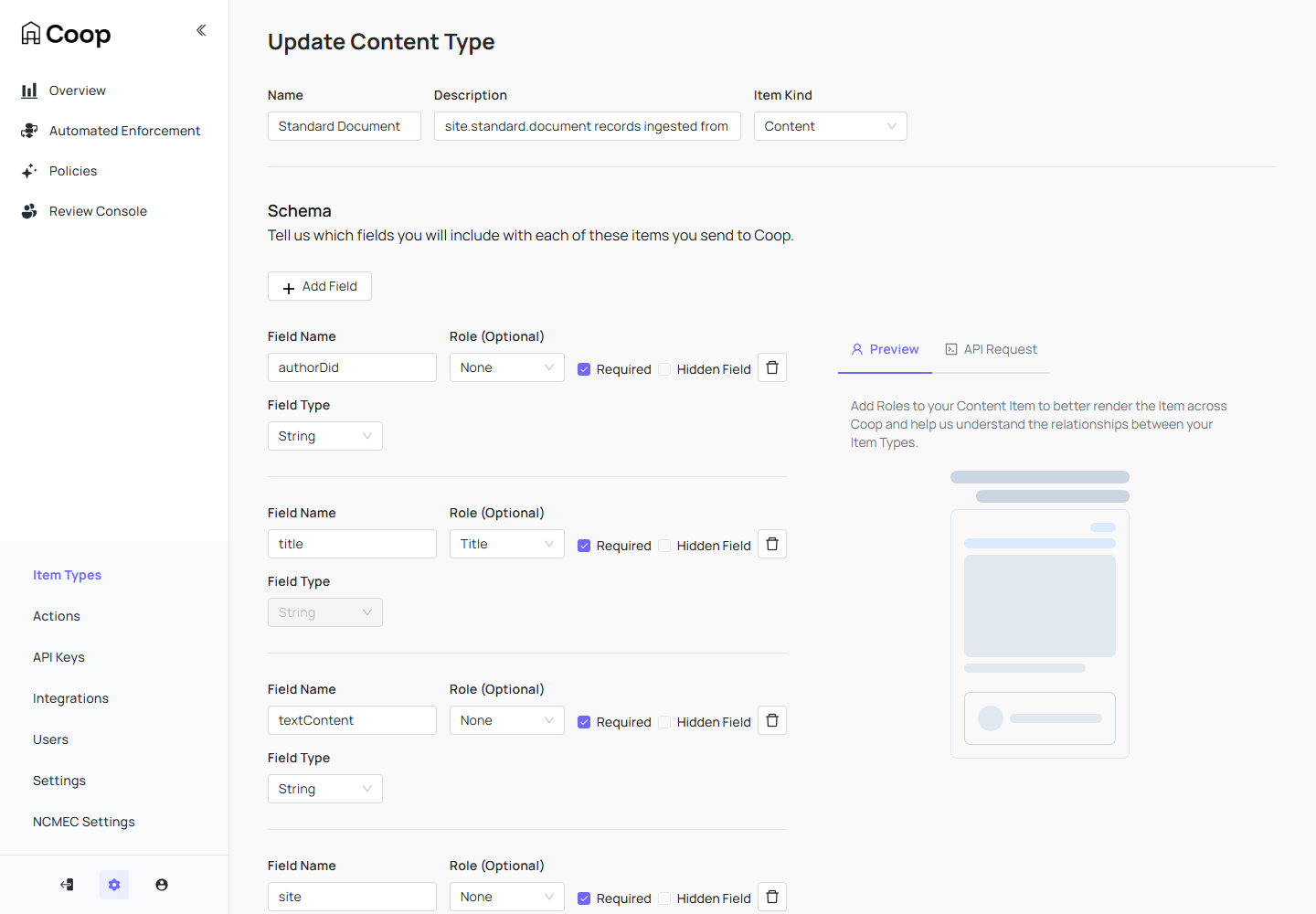
One thing worth knowing before you build the Document schema:
- A
URLfield rejectsat://URIs. Coop validatesURLfields as real web URLs, so you can't drop the document'sbskyPostRef.uri(at://…/app.bsky.feed.post/…) straight in. Convert it to thehttpspermalink instead. This is more useful for a reviewer anyway, since it's clickable. The permalink conversion is the only transform the bridge applies.
Once both types are created, copy each one's ID from the dashboard. You'll
pass them as typeId on every item. Then create an API key under
Settings → API Keys.
The bridge
The bridge reads the collection off Jetstream, maps each record onto the
item types, and batch-POSTs to Coop's
Submit Items API. It's
asynchronous; Coop returns 202 Accepted and runs your
proactive rules
against each item on a background worker.
Coop's API isn't an atproto service, so this side is just a WebSocket (via the Jetstream SDK) and an
authenticated fetch.
import { Jetstream } from "@bsky/jetstream"; // npm install @bsky/jetstream

const COOP_URL = "http://localhost:8080/api/v1/items/async/";
const API_KEY = "…"; // Settings → API Keys
const USER_TYPE_ID = "…"; // the Bluesky User item type's ID
const DOC_TYPE_ID = "…"; // the Standard Document item type's ID

const BATCH = 25; // the items API accepts batches; one request, many items
const FLUSH_MS = 3000; // ...but don't let a slow collection sit unsent

// Resolve a DID to its handle, cached; falls back to the DID so an appview hiccup never stalls ingest.
const handleCache = new Map<string, string>();
async function resolveHandle(did: string): Promise<string> {
  const cached = handleCache.get(did);
  if (cached) return cached;
  try {
    const res = await fetch(
      `https://public.api.bsky.app/xrpc/app.bsky.actor.getProfile?actor=${did}`,
    );
    if (res.ok) {
      const { handle } = (await res.json()) as { handle: string };
      handleCache.set(did, handle);
      return handle;
    }
  } catch {}
  return did;
}

// Map a commit onto two Coop items — the author (User) and the Document — so records and later reports collect on one DID.
async function toItems(msg: any) {
  const did: string = msg.did;
  const record = msg.commit.record;
  const uri: string = record.bskyPostRef?.uri ?? "";
  // at:// URIs aren't valid for a Coop URL field — use the https permalink.
  const postRkey = uri ? uri.split("/").pop() : msg.commit.rkey;

  const user = {
    id: did,
    typeId: USER_TYPE_ID,
    data: { did, handle: await resolveHandle(did) },
  };

  const docData: Record<string, unknown> = {
    // Related Item fields are serialized as { id, typeId } — not a bare string.
    author: { id: did, typeId: USER_TYPE_ID },
    title: record.title,
    textContent: record.textContent,
    site: record.site,
    path: record.path,
    bskyPostUri: `https://bsky.app/profile/${did}/post/${postRkey}`,
    publishedAt: record.publishedAt,
  };
  if (record.updatedAt) docData.updatedAt = record.updatedAt;

  // Key the item on the record's at:// URI so re-deliveries are idempotent.
  const document = {
    id: uri || `at://${did}/${msg.commit.collection}/${msg.commit.rkey}`,
    typeId: DOC_TYPE_ID,
    data: docData,
  };

  // User first, so the Related Item link resolves when Coop validates the Document.
  return [user, document];
}

async function submit(items: unknown[]) {
  const res = await fetch(COOP_URL, {
    method: "POST",
    headers: { "X-API-KEY": API_KEY, "Content-Type": "application/json" },
    body: JSON.stringify({ items }),
  });
  if (res.status !== 202) {
    console.error("submit failed:", res.status, await res.text());
  }
}

// The SDK owns the socket, decoding, and reconnects; the server-side filter does the rest.
const jetstream = new Jetstream("https://jetstream.us-east.bsky.network");

let buffer: unknown[] = [];
let lastFlush = Date.now();

for await (const evt of jetstream.live({
  collections: ["site.standard.document"],
  kinds: ["commit"],
})) {
  if (evt.kind !== "commit") continue;
  if (!["create", "update"].includes(evt.commit.operation)) continue;
  buffer.push(...(await toItems(evt)));

  if (buffer.length >= BATCH || Date.now() - lastFlush >= FLUSH_MS) {
    // Snapshot and clear before the async POST so items arriving mid-request land in the next batch.
    const batch = buffer;
    buffer = [];
    lastFlush = Date.now();
    void submit(batch);
  }
}
Leave that running and Coop fills up with documents. Each submission is keyed on
the record's at:// URI, so Jetstream's at-least-once
delivery is harmless. Re-submitting
the same URI updates the existing item rather than duplicating it. To survive a
restart, persist the last seq you handled and hand it back through a
CursorStore, exactly as in
the other Jetstream guides.
Watch it land
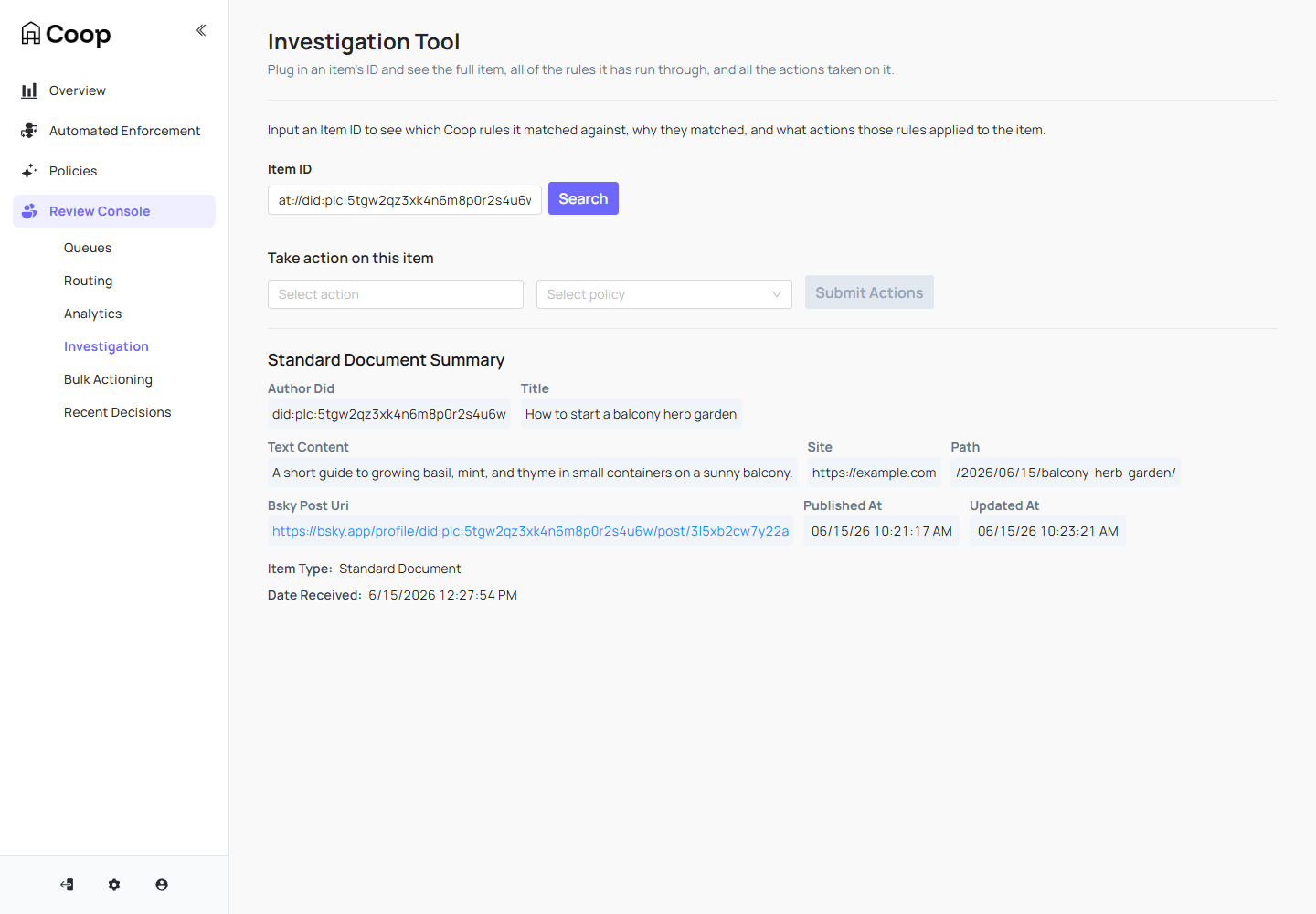
Submitted items run through Coop's proactive rules and are recorded immediately.
You can confirm any one of them in Investigation by its at:// URI; the
full record is there, mapped onto your fields, and ready to action:
To put documents in front of a human reviewer automatically rather than looking them up by hand, Coop gives you two routes:
- A Proactive Rule.
Configure a rule (e.g. a text bank matching keywords in
title/textContent, scoped to the Standard Document type) with the action Enqueue Item to Manual Review. Matching documents are routed to a review queue as Jobs as they arrive. - The Report API.
If your bridge already knows a document is worth a look,
POSTit to/api/v1/reportto create a Job directly, using the same item type anddatashape as ingest.
Both feed Coop's Review Console queues, which is where moderators work through Jobs at volume. (Routing reports to a queue is a one-time Review Console setup, separate from ingest: create a queue and a routing rule.)
Closing the loop: emitting a label
Actioning a document in Coop should do something back on the network. Coop's
model for that is Actions:
you define an action (e.g. Label as spam) with a callback URL, and when a
moderator (or a rule) applies it, Coop POSTs the decision to your endpoint.
That's where you translate a Coop decision into an atproto
moderation label.
A minimal receiver verifies the request came from Coop, maps the action to a
label value, and emits it through your labeler. If you run Ozone,
that's a single tools.ozone.moderation.emitEvent call with the
lex SDK.
Run
lex install tools.ozone.moderation.emitEvent && lex build to generate
./lexicons first, then:
import express from "express"; // npm install express @atproto/lex @atproto/lex-password-session
import { Client } from "@atproto/lex";
import { PasswordSession } from "@atproto/lex-password-session";
import * as tools from "./lexicons/tools.js"; // generated by `lex build`

const LABELER_DID = process.env.LABELER_DID!; // your labeler's DID

// Authenticated session for your labeler account (the one declared as a
// labeler in its DID document). See the labeler guide linked below.
const session = await PasswordSession.login({
  service: "https://bsky.social",
  identifier: "your-labeler.bsky.social",
  password: process.env.APP_PASSWORD!,
});
const client = new Client(session);

// Map Coop actions -> label values your labeler defines.
const ACTION_TO_LABEL: Record<string, string> = {
  "label-as-spam": "spam",
};

const app = express();
app.use(express.json());

app.post("/coop/action", async (req, res) => {
  // Verify the Coop-Signature header before trusting the payload — see
  // https://roostorg.github.io/coop/latest/development/api-auth.html
  const labelVal = ACTION_TO_LABEL[req.body.action.id];
  if (!labelVal) return res.status(204).end();

  // Coop's item id is the document's at:// URI; index 2 is the repo (author) DID.
  const authorDid = req.body.item.id.split("/")[2];

  await client.call(
    tools.ozone.moderation.emitEvent,
    {
      createdBy: session.did,
      subject: { $type: "com.atproto.admin.defs#repoRef", did: authorDid },
      event: {
        $type: "tools.ozone.moderation.defs#modEventLabel",
        createLabelVals: [labelVal],
        negateLabelVals: [],
      },
    },
    { service: `${LABELER_DID}#atproto_labeler` },
  );

  res.status(200).end();
});

app.listen(3000);
The document has now made a full round trip: it left the network through Jetstream, was reviewed in Coop, and a label went back onto it through your labeler, where any client that subscribes to your labeler will see it.
To stand up an atproto Labeler, refer to:
- Labels — what labels are and how they behave.
- Creating a labeler and Using Ozone — running the service that publishes them.
See also
- Jetstream — the live tail, filtering, and endpoints this builds on.
- Jetstream SDK — the TypeScript client used for the stream above, in place of a hand-rolled WebSocket.
- Network Replay with Jetstream — replay the document back catalogue from history before going live.
- Forwarding to webhooks — the same ingest shape, pointed at a chat channel instead of a moderation tool.
- Coop documentation — item types, rules, the review console, and the APIs used here.